
Extended Reality (XR) training is growing fast in sectors like aviation, manufacturing, healthcare, energy, and defense. Companies want realistic, high-quality content that runs smoothly on headsets and browsers. The problem is: building XR content takes too much time, money, and manual effort.
This is where AI steps in and changes the whole pipeline.
This post breaks down how XR content used to be built, what the pipeline looks like today, and how AI reshapes every step: from input to final delivery. The attached flow diagrams show a clear shift from manual, linear steps to an AI-powered, automated loop.
1. The Traditional XR Content Pipeline
Before AI, XR content production was slow and expensive. Each stage needed human specialists. Every change took days or weeks.

a. Content Generation
Teams created assets either by:
- scanning real objects
- modelling by hand
- buying from marketplaces
All of this needed skilled 3D artists and technical staff.
b. Optimization
Scanned and hand-built models were too heavy for real-time XR. So teams manually:
- decimated meshes
- sliced models
- created LODs
This work was repetitive and error-prone.
c. Animation
Artists built:
- materials
- lighting
- skin weights
- animations
- audio
Each step required long hours of tuning and checking across tools.
d. Content Publishing
After models were ready:
- export as FBX/OBJ
- import into Unity or Unreal
- bundle assets
- upload to cloud
Each step had failure points.
e. Content Consumption
Enterprises then streamed or downloaded content onto devices:
- mobile
- XR headsets
- PCs
Even here, performance issues forced more optimization work, delays, and extra cost.
2. The Pain Points Before AI
The old pipeline suffered from clear blocks:
a. Too many specialists
3D artists, animators, rigging experts, texture artists, Unity developers, pipeline engineers.
b. Slow changes
Small updates required full rebuilds.
c.High cost
Projects ran into tens or hundreds of lakhs for enterprise training modules.
d. Content variation issues
Different vendors produced assets with inconsistent quality and style.
e. Scaling issues
Producing 10 objects was easy. Producing 1,000 objects for a global training rollout was slow and unrealistic.
f. Device limitations
XR headsets needed light assets. Manual optimization slowed everything down.
This bottleneck is exactly why most enterprise XR training projects failed to scale.
3. The AI-Powered XR Pipeline
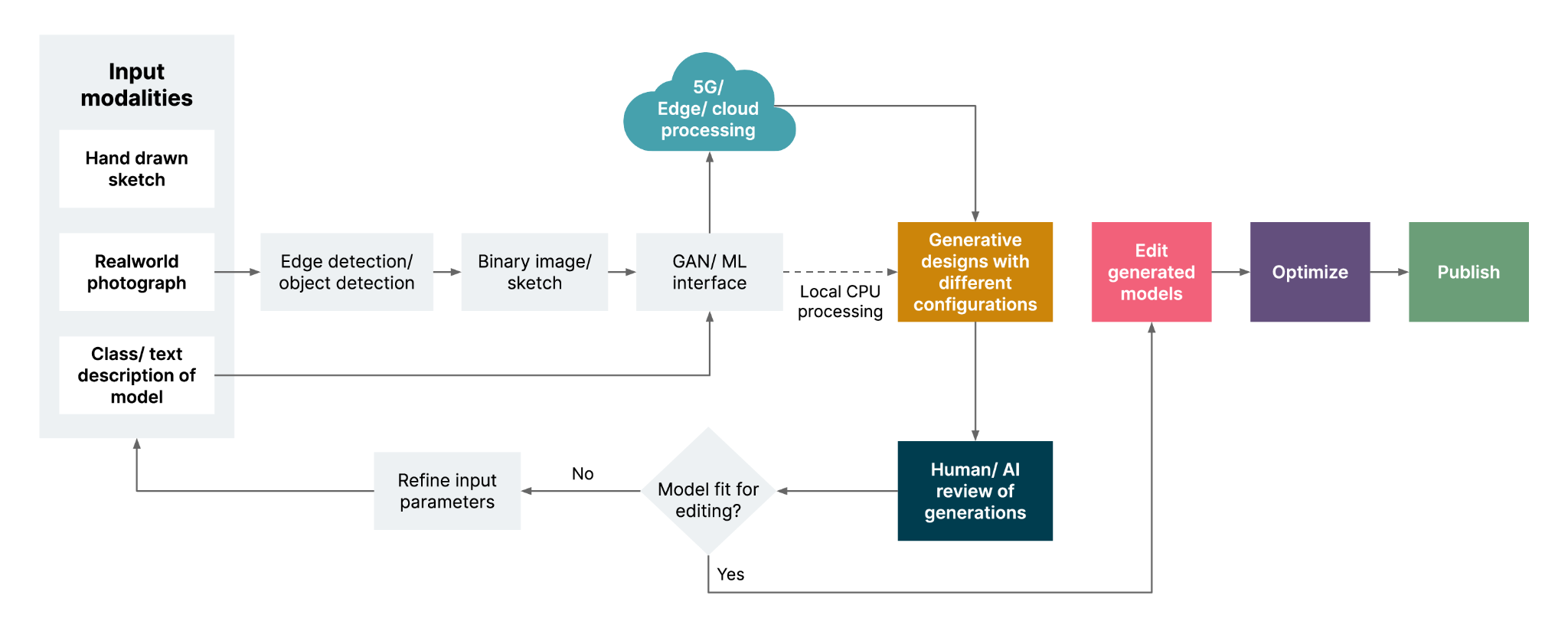
AI flips the pipeline. This new flow unlocks speed, consistency, and scale. Let’s break down the updated steps.
Input Modalities: Many Ways to Start
AI allows teams to start from multiple inputs:
1. Hand-drawn sketches
Simple outlines become detailed 3D models.
2. Real-world photographs
Multiple angles can produce textured models.
3. Text descriptions
Users type: “Create a hydraulic pump with openable parts”, the pipeline converts this into 3D assets.
4. Class-level descriptions
For example: “industrial tools”, AI generates a set of tools matching the category. This flexibility removes the biggest early bottleneck, manual 3D modelling.
Automatic Pre-Processing
AI systems detect edges, objects, shapes, and geometry from the inputs.
Steps include:
- edge detection
- object detection
- binary image creation
- segmentation
This step gives a clean blueprint for 3D model construction.
AI Model Generation (GAN / Diffusion / 3D Generators)
The pipeline connects to a GAN or diffusion model. This engine builds a rough 3D model using:
- cloud GPUs
- local CPU (fallback)
- 5G/edge computing for low-latency output
This model may not be final, but it forms a fast, repeatable base. Enterprises can now generate hundreds of prototypes every day instead of one or two per week.
Generative Design Loop
This stage is shown in yellow in the diagram. AI creates:
- multiple variants
- different configurations
- different material options
- different LOD suggestions
This step used to take days of manual tuning. Now the system produces variations in minutes.
Human + AI Review
Humans inspect AI output. If the model is wrong or incomplete, the system loops back. Human reviewers check:
- scale
- texture accuracy
- functionality
- realism
- enterprise safety norms
AI then refines based on feedback. This loop continues until the asset is ready for editing.
AI Assisted Editing
Instead of full manual rework, AI helps users:
- retopo
- clean mesh
- auto-UV unwrap
- rebuild textures
- auto-rig characters
- generate physics points
- prepare models for Unity/Unreal
Users now guide, not grind.
AI Driven Optimization
This matches the “Optimization” column in the first diagram. AI handles:
- decimation
- slicing
- LOD generation
AI optimizers study the target device:
- Meta Quest
- Pico
- Apple Vision Pro
- mobile
- WebXR
Then they tune assets to run smoothly. Before AI, this step often broke pipelines. Now it runs cleanly in minutes.
Publish
Once ready, the pipeline exports to:
- FBX
- OBJ
- USDZ
- GLB
Then it imports into a game engine. AI builds asset bundles and prepares cloud streaming. Enterprises get ready-to-deploy content.
AI Powered On-Demand Cloud Streaming
In the final stage (purple box from the first diagram):
- assets live in the cloud
- edge servers stream content
- users on XR headsets render scenes instantly
This removes the need for heavy downloads or device-side compute.
This is perfect for enterprise training:
- factory workers
- field technicians
- pilots
- medical trainees
Content becomes easy to update and deploy worldwide.
4. How AI Changes the Pipeline
Let’s compare the major differences.
Speed
Before:
8–12 weeks for a single module.
After AI:
1–5 days.
Skill requirement
Before:
3D artists, riggers, animators, Unity developers.
After AI:
One operator + AI tools.
Cost
Before:
Very high due to manpower.
After AI:
Low and predictable.
Scalability
Before:
Hard to build hundreds of assets.
After AI:
Generate thousands on demand.
Consistency
Before:
Different artists produce different visual styles.
After AI:
AI enforces unified design standards across teams.
Error handling
Before:
Errors found late, rework costly.
After AI:
Looped refinement catches issues early.
Device performance
Before:
Manual optimization required.
After AI:
Automatic LOD, materials, mesh clean-up.